Query Parameters (Parameterized Queries)
A parameterized query is a Query Definition whose filters use query parameters instead of fixed values. A parameter is a named placeholder whose value is resolved when the query runs: from the current instance, from the current user, or from a value supplied by the caller. One query can then serve many contexts, which removes duplicated queries and keeps business rules in one place.
Typical examples:
- A "Tasks of the Selected Project" query that is driven by the project of the open record.
- A "My Open Items" query that uses the logged-in user.
- A filtered reference attribute whose choices depend on another field of the form.
- An integration that calls the same saved query for different projects by passing a different value each time.
Parameter properties
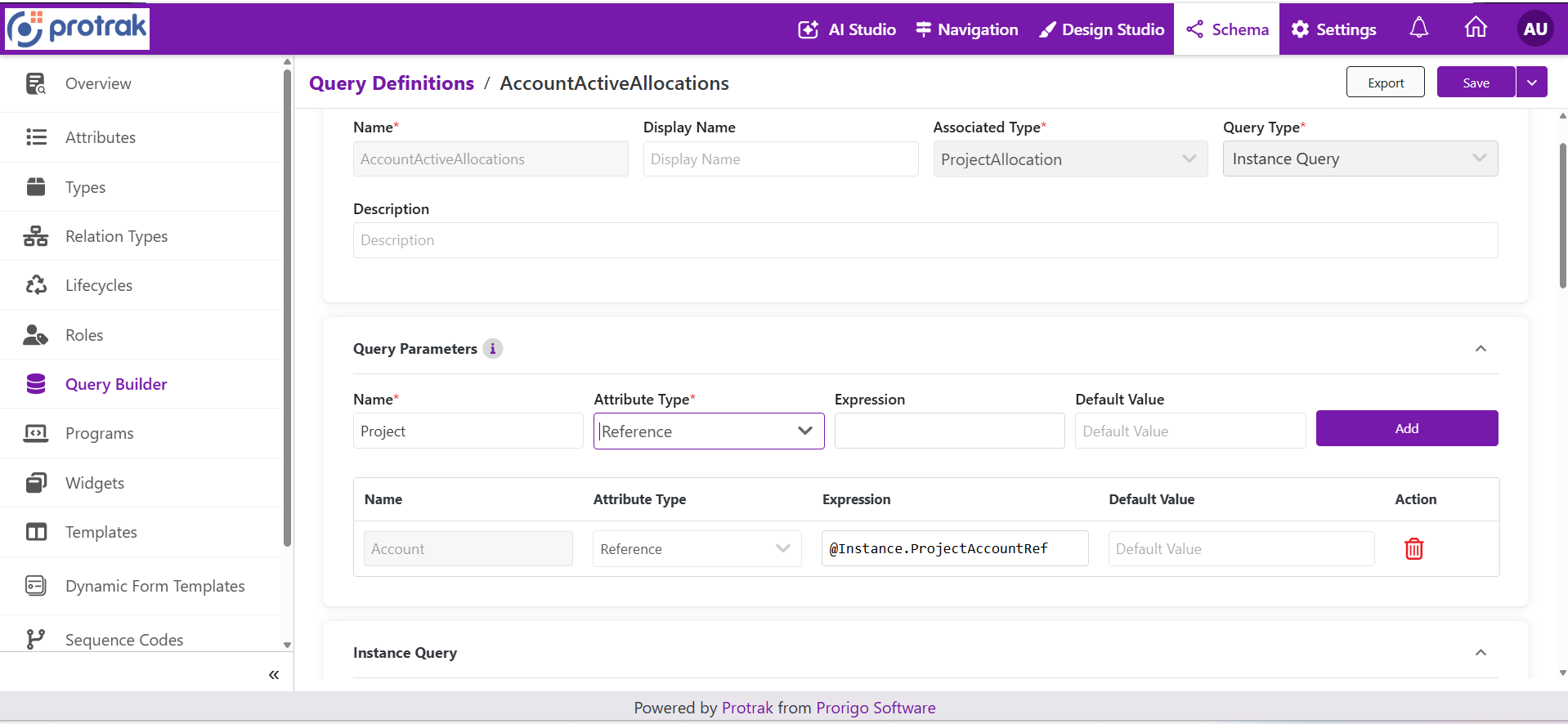 The Query Parameters section. Enter the Name, choose the Attribute Type, optionally enter an Expression and a Default Value, then select Add. The list below shows the parameters already defined; here
Account is a Reference with the expression @Instance.ProjectAccountRef.
| Property | Description |
|---|---|
| Name | Unique identifier of the parameter. Filters and callers refer to the parameter by this name. |
| Attribute Type | The data type of the value the parameter carries: Text, User, Boolean, Picklist, Currency, DateTime, Date, Numeric, or Reference. Select it before entering an expression. |
| Expression | Optional. Resolves the value from the current instance or the current user (see Expressions). |
| Default Value | Optional. The value used when the expression does not resolve a value, or when the caller supplies none. |
Use Add to add a parameter and the delete icon to remove one. The Toggle parameters control collapses the section.
Rules
- Parameter names must be unique within the query.
- A parameter must be defined before it can be selected in a filter.
- The Attribute Type must be chosen before an expression can be entered. It decides which attributes the expression may refer to. The server recalculates the type from the expression on every save, so a parameter's type can never drift from what its expression resolves to.
- The attribute that the expression refers to must be of the same type as the parameter.
- Changing the Attribute Type clears the Default Value, because a value that is valid for the old type may not be valid for the new one.
- An expression takes priority over the default value whenever it resolves to a value.
- The default value must be a valid value for the parameter's type.
- Parameter names and types are part of the query's contract. Renaming or retyping a parameter can break widgets, API clients, and schema packages that already supply values.
Expressions
An expression reads an attribute of the current instance or of the current user, using the same syntax as other dynamic value expressions:
| Expression | Resolves to |
|---|---|
@Instance.Name | The Name attribute of the instance the widget or form is shown for. |
@User.PinCode | The PinCode attribute of the logged-in user. |
Relation navigation is not available in a query parameter expression.
Where a parameter can be used
A parameter is selected where a filter has a dynamic value switch.
| Place | Which parameters are valid |
|---|---|
| Attribute Filter: dynamic first value, and dynamic second value for Between | For User, Date, and DateTime attributes, the parameter's Attribute Type must be exactly the same as the attribute's type. For a Numeric attribute, a Text, Numeric, or Currency parameter is accepted. Every other attribute type accepts any parameter. |
| Parent Filter: dynamic value | Only Reference parameters, because a parent filter always resolves to a set of instance identifiers. |
| Relation filters of a Relation or Structured Query | Same rule as a parent filter: Reference parameters. |
These rules are checked when the query is saved and again when a schema is imported. A mismatch is rejected with a validation message that names the parameter.
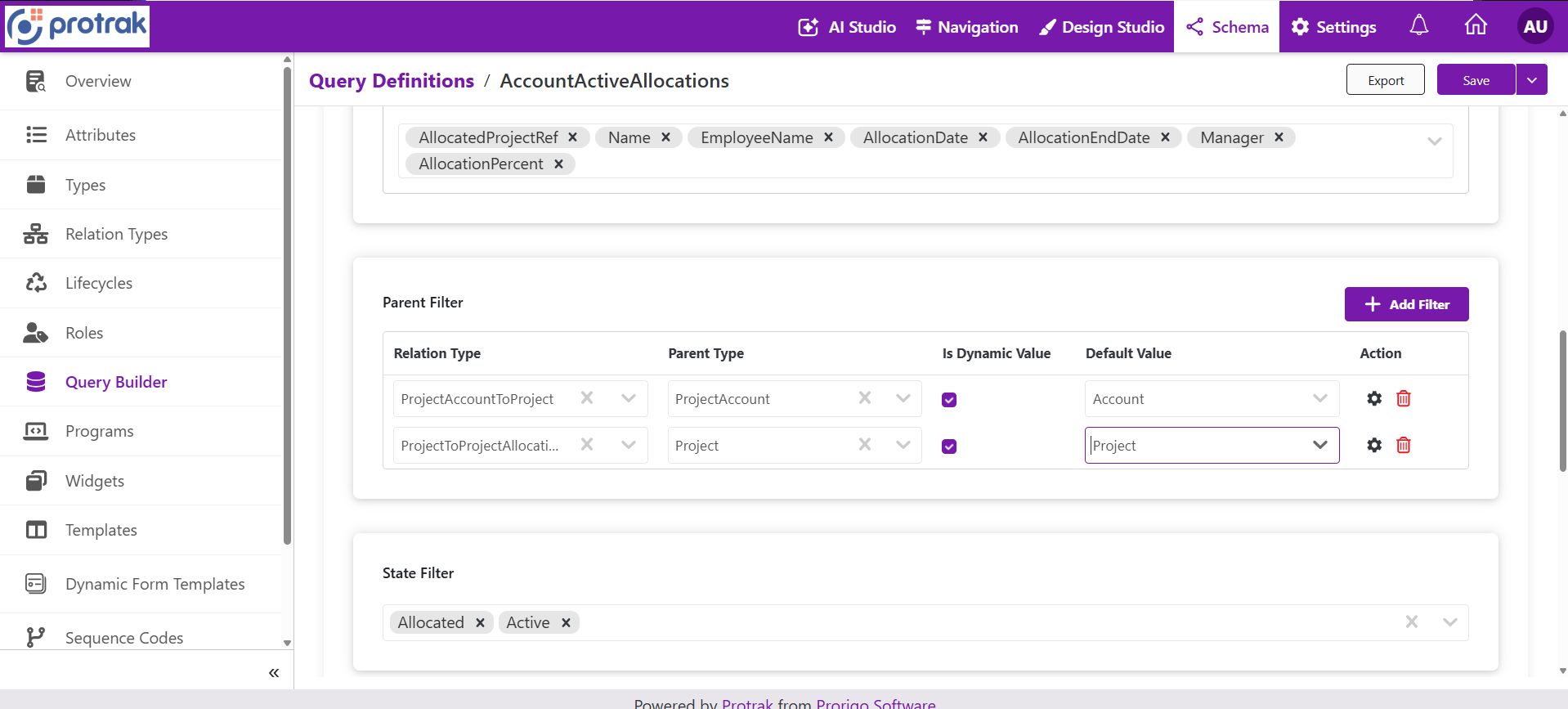 Two Parent Filters with Is Dynamic Value selected. The Default Value column holds the Reference parameters to use (
Account and Project).
Static and dynamic values
Each filter value is either static (typed into the query) or dynamic (taken from a parameter).
| Mode | Behavior |
|---|---|
| Static | The value entered in the query is used on every run. |
| Dynamic | The value comes from the selected parameter each time the query runs. |
In the stored query the dynamic switch of an attribute condition is isFirstValueDynamic with firstValueParameterName (and isSecondValueDynamic with secondValueParameterName). On a parent or relation filter it is isValueDynamic with dynamicValueParameterName.
How a value is resolved at run time
The value of a parameter is resolved in this order, and the first source that gives a value wins:
- The expression, evaluated against the current instance or user.
- The value supplied by the caller.
- The parameter's default value.
Where the resolution happens depends on who runs the query:
| Caller | Who evaluates the expression | Result |
|---|---|---|
| Widgets, forms, and reference attributes in the application | The application evaluates the expression in the browser against the open instance or the logged-in user, then sends the query with the resulting values. | If there is no instance context (for example a widget shown outside an open record), the default value is used. |
Query Builder API: executeQuery and executeQueryByName | Nobody: the server does not evaluate @Instance or @User expressions. The caller must pass the value for each parameter. | A parameter not supplied uses its default value. |
Query Builder API: execute | Not applicable. Dynamic fields are not used; the request contains literal values. | Send the final values in the conditions. |
Because the server does not evaluate expressions, an integration that calls a saved query must pass every parameter it needs, or rely on the default values.
What happens to a blank or missing value
- Attribute condition: a dynamic condition whose parameter resolves to a blank value is ignored: the condition is removed and the query still runs. This applies to conditions that need a value. Operators that need no value (IsEmpty, IsNotEmpty, Today, ContextUser, the Last... and Next... ranges) are not affected by a blank value.
- Between: if the second value is required and blank, the whole condition is ignored.
- Parent or relation filter: a missing or invalid value can leave the filter without instances, so the query returns no records, or the request fails validation (see below).
Because a blank dynamic condition is dropped, a missing parameter can return more records than intended, not fewer. Always pass the parameters a query depends on, and test the "no value" case.
Value format per parameter type
The value supplied for a parameter (by the application or by an API caller) must be in the format the filter expects.
| Parameter type | Format | Notes |
|---|---|---|
| Text | The text | |
| Numeric, Currency | A number as text, for example 1250.5 | Also accepted for a Numeric attribute when the parameter is Text. |
| Boolean | true or false | |
| Date, DateTime | ISO 8601, for example 2026-01-31 or 2026-01-31T09:30:00Z | Time zone rules: see Filter Values and Logic. |
| Picklist | The option display name; several names separated by commas | See Picklist fields. |
| User | For a User attribute condition: the user identifier. For a condition on a different attribute type (for example Text): the user name. Several values are separated by commas. | The format depends on the type of the attribute being filtered, not only on the parameter's type. |
| Reference in an attribute condition | The names of the referenced instances, one per line for In and NotIn | A single name is used with Equals or Contains. |
| Reference in a parent or relation filter | One or more instance identifiers, separated by commas | An identifier that is not valid fails the request. |
Use in each context
Widgets and relation widgets
Select the saved query in the widget. Parameters are filled from the page context: the open instance for @Instance expressions and the logged-in user for @User expressions. Map every required parameter, and test the widget both inside and outside an open record.
Reference attributes and dependent references
A reference attribute can use an Instance Query to limit its choices. A parent filter with Is Dynamic Value selected and a Reference parameter makes the attribute dependent on another field of the form: the choices update as that field changes. With the dynamic switch off, the choices are filtered once by the fixed parent. See Query Definition for Reference Attributes.
Query Builder API
GET /api/v1.0/queries/OpenProjectTasksByOwner/executeQueryByName?queryParameters[ProjectId]=7b1f3c0e-5d8a-4c55-9a27-0a6f3d2b9e11&queryParameters[Status]=Open
- Use one
queryParameters[Name]=valueper parameter, with the exact parameter name. - Values follow the formats above.
- A parameter that is not passed uses its default value.
- Details and errors: Query Builder API.
Example: Tasks of a selected project
-
Query parameters
Name Attribute Type Expression Default Value ProjectReference @Instance.Project(empty) StatusPicklist (none) Open -
Instance Query on the type
Task:- Parent Filter: relation type
ProjectToTask, parent typeProject, Is Dynamic Value selected, parameterProject. - Attribute Filter:
StatusEquals dynamic, parameterStatus.
- Parent Filter: relation type
-
Result: in a widget placed on a Project record, the
Projectparameter resolves to that project, andStatusfalls back toOpen. An API caller passesqueryParameters[Project]=<project identifier>and optionallyqueryParameters[Status]=InProgress.
Best practices
- Prefer parameters over several nearly identical queries.
- Give parameters clear, stable names, and describe their source (page context, user, widget setting, or API caller) in the query description.
- Always set a sensible default value for parameters that an API caller may omit, and decide deliberately whether "omitted" should widen the result.
- Use Reference parameters for parent filters, and the same type as the attribute for User, Date, and DateTime conditions.
- Validate parameter values before sending them, especially identifiers and dates.
- Do not treat a parameter as a security boundary: results always respect the caller's permissions.
- After changing a parameter's name or type, re-test every widget, reference attribute, API client, and schema package that uses the query.
Troubleshooting
| Symptom | Likely cause | What to do |
|---|---|---|
| Save fails with a message about a parameter and an attribute type | The parameter type does not match the attribute type (User, Date, DateTime, or Numeric condition) | Change the parameter's Attribute Type, or use another parameter. |
| Save fails for a parent filter | The selected parameter is not a Reference | Use a Reference parameter. |
| Expression field is disabled | No Attribute Type is selected | Select the Attribute Type first. |
| Default value disappeared | The Attribute Type was changed | Re-enter a default value valid for the new type. |
| More records than expected | A dynamic condition received a blank value and was ignored | Pass the parameter or set a default value. |
| No records in a widget | The expression has no instance context, and no default value is set | Set a default value, or place the widget on the record that provides the value. |
API call ignores an @Instance expression | The server does not evaluate expressions | Pass the value in queryParameters[Name]. |
| API call fails with an invalid identifier error | A parent or relation parameter value is not a valid identifier | Pass valid identifiers separated by commas. |