Relations, Nesting, and Recursion
This page explains how a query follows relations: what To, From, and Both mean, how multi-step paths work, how related queries nest, and how to walk a self-referential relation such as "all sub-tasks of a task".
Parent filters and relation filters
A relation filter describes one step through a relation type. It is used in two places:
| Where | Name | Purpose |
|---|---|---|
| In an Instance Query | Parent filters | Restrict the returned instances to those connected to given parent instances. The direction is fixed: the filter's type is the parent of the returned instances, and a direction value, if sent, is ignored. A query accepts at most 20 parent filters by default. |
| In a Relation Query or a related query | Relation filters | Define the path from a source instance to the related instances to return. |
Each relation filter contains:
| Field | Description |
|---|---|
Type (typeName) | The type of the instances at this step. Required. |
Relation type (relationTypeName) | The relation type to follow. Required. |
Direction (relationDirection) | To, From, or Both. If omitted it defaults to From, so always set it explicitly. |
Instance (instanceId, instanceIds) | Optional. Pins the step to one or more specific instances. |
State filters (stateFilters) | Optional. State names for the instances at this step (any of). |
Attribute filters (attributeFilterExpressions) | Optional. Conditions on the instances at this step. |
Parent filters in detail
Parent filters narrow an Instance Query to instances that sit under given parent instances. They behave as follows.
Several parent filters form a chain, not a set of independent conditions. Filters are applied in their listed order, and each one leads to the next:
| Order | Role | Example |
|---|---|---|
| First filter | The topmost ancestor | Type Program, relation ProgramToProject |
| Next filters | The following level down | Type Project, relation ProjectToTask |
| Last filter | The direct parent of the returned instances | The returned type is Task |
Each filter's relation type connects its type to the type of the next filter, and the last filter's relation connects to the returned type. To require two unrelated parents, run two queries.
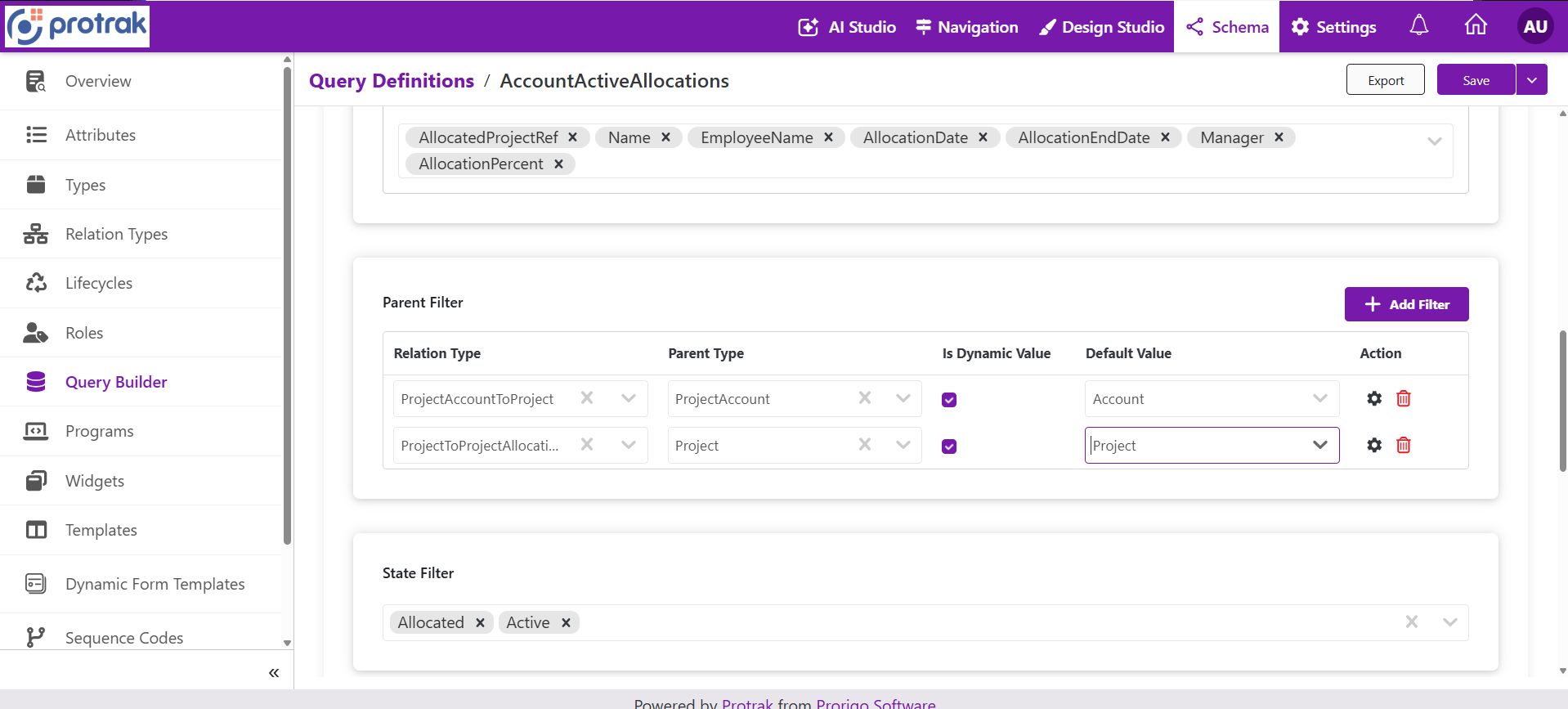 Two parent filters on a
ProjectAllocation query. Read top to bottom: ProjectAccount (relation ProjectAccountToProject), then Project (relation ProjectToProjectAllocation), then the returned ProjectAllocation records.
How a single filter selects its parent instances:
| What you set on the filter | Effect |
|---|---|
instanceId | Only that parent. If the user cannot access it, the query fails with 403. |
instanceIds | Any of these parents. Parents the user cannot access are left out. |
stateFilters and/or attributeFilterExpressions | The parents are first looked up by those conditions (on the filter's type), and only instances under those parents are returned. |
| Instance ids together with conditions | Only parents that satisfy both. |
| Nothing (no instance, no conditions) | Instances that have any parent of that type through that relation. |
- If the conditions match no parent, the query returns no instances.
- A query accepts at most 20 parent filters by default; more fails the request.
- The relation direction of a parent filter is fixed, and a direction value is ignored.
- Attribute conditions on a parent filter use the same value formats as any other condition, and are evaluated against the parent's type.
- In a saved query, a parent filter can be dynamic: its parameter resolves to parent instance identifiers. See Query Parameters.
- Parent filters are evaluated with the caller's permissions, so inaccessible instances never contribute.
Direction
In a relation query, the source is the instance that the query starts from (the current instance, or the instance returned by the parent level). The filter's type is the type of instance you want back. A relation type has a From end and a To end, as defined on the relation type.
| Direction | Walk | The source is at the relation's | The result is at the relation's |
|---|---|---|---|
| To | Along the relation, for example ProjectToTask: from a Project to its Tasks | From end | To end |
| From | Against the relation, for example from a Task back to its Project | To end | From end |
| Both | Not supported. As the first (or only) step the request fails. In a later step it is silently skipped, which gives wrong results. Never send it; use one To query and one From query. |
Look at the relation type's From and To ends in the schema before choosing a direction. Using the wrong direction returns no related instances instead of an error.
Multi-step paths
A relation query can contain several relation filters. They are applied in order: the result of each step is the source of the next one, and the last filter's type is the type that is returned.
Example (relation names are illustrative): documents of a project.
| Step | Type | Relation type | Direction |
|---|---|---|---|
| 1 | Deliverable | ProjectToDeliverable | To |
| 2 | Document | DeliverableToDocument | To |
- Each step can add state and attribute criteria, so unrelated records do not enter the result.
- An intermediate step pinned to a specific instance must really be related to the previous step; otherwise the query fails.
- State and attribute filters of the query itself apply to the last step (the returned instances).
Nested related queries
An Instance Query (or a Structured Query) can carry related query definitions that attach related instances to every returned instance. Each related query definition can itself carry further related query definitions.
Instance Query (Task)
 └─ Related query: Task → sub-Task        (level 1)
     └─ Related query: sub-Task → sub-Task    (level 2)
         └─ ...
| Topic | Behavior |
|---|---|
| Depth | Any depth. No depth limit is enforced. |
| Execution | Each level runs once for all instances found by the level above, then its own nested queries run for the instances it found. A level with no results stops the descent. |
| Which instances | Related items are attached only to the instances in the returned page. |
| Result shape | Related instances appear under relatedItems of each instance, keyed by the type name of the last relation filter. Each related instance can have its own relatedItems. |
| Siblings with the same target type | Two related queries at the same level that return the same type are merged under one key: their items are combined, and the total count is the larger of the two. Use one related query per target type per level. |
| Paging | skip, take, and the total count of a related level count relation rows across all source instances, not per source instance. Allow a generous take when there are many source instances. |
| Sorting | Use the related query's sortBy. A separate sortOrders list is ignored when a query is sent to the API. |
| Permissions | Related instances the user cannot access are left out. See Query Builder API. |
Recursion: walking a self-referential relation
A relation that connects a type to itself, such as Task to sub-Task, can be followed, but not recursively to unlimited depth. A query follows exactly as many levels as it contains. There is no "until the end of the hierarchy" option.
To answer "all sub-tasks of T-72-191":
- Nest a fixed depth. Repeat the same related query at each level, for example 5 to 10 levels deep. The levels beyond the real depth return nothing and stop the descent.
- Or query level by level. Run a query for the sub-tasks of the task, then another for the sub-tasks of the instances found, and stop when a level returns no instances.
If the data can be deeper than the levels you query, say so in any answer built from the result, because deeper levels are not returned. Cost grows with both depth and the number of instances per level, so keep the depth purposeful.
In a self-referential walk, the key under relatedItems is the same type name at every level (for example Task).
See the worked example in Query Builder API for a two-level sub-task query.