pageContext Reference
Every custom widget receives a single argument called pageContext. It is the platform's way of giving your widget everything it needs about the current page, record, and user.
The properties available depend on the target type your widget is registered with, but a set of common properties is present in every widget.
Common properties (all target types)
These are injected automatically by the platform into every widget, regardless of target type.
{
  settings: {
    id: string,                   // Tenant ID (used in file download paths)
    logoUrl: string,              // Tenant logo URL
    dateTimeFormat: {
      dateFormat: 'M/d/yyyy',     // Tenant date format (e.g. 'dd/MMM/yy')
      timeFormat: 'hmsa',         // Tenant time format (e.g. 'hms')
      timeZone: '(UTC+05:30) ...', // Tenant timezone label
      timeZoneId: string,         // IANA timezone ID
    },
    fileTypes: [ ... ],           // Allowed file types for attachments
  },
  locale: {
    name: string,        // e.g. 'en-US'
    displayName: string,
  },
  userData: {
    userId,
    name,            // Display name of the logged-in user
    email,
    roles,           // Array of role name strings
    isAdmin,         // true if user has Admin role
    pictureUrl,      // URL of user's avatar image
    typeInstanceId,  // instanceId of the user's UserProfile record
    profile: {       // Full UserProfile instance
      id, name, instanceTypeName,
      attributes,    // Array of attribute objects (FirstName, LastName, Phone…)
      state, lifecycle, allowedOperations, modified
    }
  }
}
Example — show the user's name:
function GreetingWidget(pageContext) {
  const { H2 } = React.useContext(customWidgetContext).protrakComponents;
  return <H2>Hello, {pageContext.userData.name}!</H2>;
}
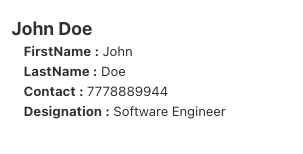
Example — read a profile attribute:
const firstName =
  pageContext.userData.profile?.attributes.find(
    (a) => a.name === "STANDARDFirstName",
  )?.textValue ?? "";
Preview:
Reading attribute values
Layouts that show a record (View, Edit, Create) provide attributeValues and editedValues, and so do Edit Relation forms, where the record is the relation. Each is an object keyed by attribute name. The value field name depends on the attribute type:
| Attribute Type | Value field | Example |
|---|---|---|
Text, RichText | textValue | "Partnership Agreement" |
Numeric, Currency, Expression | numericValue | 42.5 |
Boolean | booleanValue | true |
Date, DateTime | dateValue (ISO string) | "2026-01-15T00:00:00" |
Picklist | arrayValue | ["Option1"] |
Reference | referenceValues | [{ id, name }] |
User | userValues | [{ userId, userName, userEmail }] |
Attachment | fileId | "file-guid-string" |
// Read saved value
const title = pageContext.attributeValues["Name"]?.textValue ?? "—";

// Read working value (respects in-progress edits + saved fallback)
const titleAttr = pageContext.getAttributeWorkingValue?.("Name");
const title = titleAttr?.textValue ?? "—";
AttributeObject shape
Each entry in attributeValues / editedValues is an AttributeObject. This is also what you construct and pass to onAttributeEdit:
// Text
{ name: string, type: 'Text', textValue: string, canUpdate: boolean }

// Numeric / Currency
{ name: string, type: 'Numeric', numericValue: number, canUpdate: boolean }

// Boolean
{ name: string, type: 'Boolean', booleanValue: boolean, canUpdate: boolean }

// Date / DateTime  (ISO string without timezone offset)
{ name: string, type: 'Date', dateValue: string, canUpdate: boolean }

// Picklist
{ name: string, type: 'Picklist', arrayValue: string[], canUpdate: boolean }

// Reference
{ name: string, type: 'Reference', referenceValues: [{ id: string, name: string }], canUpdate: boolean }

// User
{ name: string, type: 'User', userValues: [{ userId: string, userName: string, userEmail: string }], canUpdate: boolean }

// Attachment
{ name: string, type: 'Attachment', fileId: string, canUpdate: boolean }
Use Enums.AttributeTypes to compare types without hardcoding strings:
const { Enums } = protrakUtils;

switch (attr.type) {
  case Enums.AttributeTypes.Text:
    return attr.textValue;
  case Enums.AttributeTypes.Numeric:
  case Enums.AttributeTypes.Currency:
    return attr.numericValue;
  case Enums.AttributeTypes.Boolean:
    return attr.booleanValue;
  case Enums.AttributeTypes.Date:
  case Enums.AttributeTypes.DateTime:
    return attr.dateValue;
  case Enums.AttributeTypes.Picklist:
    return attr.arrayValue;
  case Enums.AttributeTypes.Reference:
    return attr.referenceValues;
  case Enums.AttributeTypes.User:
    return attr.userValues;
}
onAttributeEdit signature
pageContext.onAttributeEdit(
  attrName, // string — must match the attribute's registered name exactly
  attrObject, // AttributeObject — must include canUpdate: true
  "", // always empty string — required by the platform API
);
Example — Text (JSON payload):
pageContext.onAttributeEdit(
  "MyJsonAttribute",
  {
    name: "MyJsonAttribute",
    type: "Text",
    canUpdate: true,
    textValue: JSON.stringify(myData),
  },
  "",
);
Example — Reference:
pageContext.onAttributeEdit(
  "MyReferenceAttribute",
  {
    name: "MyReferenceAttribute",
    type: "Reference",
    canUpdate: true,
    referenceValues: [{ id: selectedId, name: selectedName }],
  },
  "",
);
Target-specific properties
HomePage
Source: HomeLayoutV2WidgetRenderers.jsx
{
  name,         // Widget's registered name
  displayName,  // Widget's display label
  // + common: settings, userData
}
The Home Page widget has the minimal pageContext — just the widget identity and user data. Use useProtrakApi to fetch any data you need.
See: Home Page Widget
DashboardLayout
Source: DashboardCustomWidget.jsx
{
  instanceType,        // Type name the dashboard belongs to (e.g. "Project")
  name,                // Widget's registered name
  displayName,         // Widget's display label
  typeSingularName,    // Type singular name (e.g. "Project")
  typePluralName,      // Type plural name (e.g. "Projects")
  currentWidgetConfig, // Full widget configuration object from Admin
  // + common: settings, userData
}
Dashboard widgets do not receive pre-fetched record data. Use useProtrakApi to fetch the records you need for display.
ViewLayout
Source: ViewWidgetRenderer.jsx
{
  // Record identity
  instanceType,         // Type name (e.g. "Project")
  instanceId,           // ID of the record being viewed
  instanceDetails,      // Full record object (name, state, lifecycle, allowedOperations, …)

  // Attribute data
  attributeValues,      // { [attrName]: attributeObj } — saved values
  editedValues,         // { [attrName]: attributeObj } — in-progress edits
  getAttributeWorkingValue, // function(attrName) → edited value if pending, else saved

  // Edit integration
  onAttributeEdit,      // function(attrName, attrObj, errorMsg) — push a change into the form
  saveInstance,         // function() — trigger save from within the widget
  createInstance,       // function() — available on view layout (for embedded create flows)
  saveOperationState,   // { isLoading, isError, data }
  reloadInstanceDetails, // function() — reload the record

  // Layout config
  editMode,             // "None" | "Inline" | "Full"
  layoutConfig,         // Admin view layout configuration
  instanceEditDispatch, // Low-level reducer dispatch (advanced use)

  // Permissions
  canConnect,           // boolean — user can link related instances
  allowedOperations,    // Array of operation strings (see Enums.AllowedOperations)

  // Lifecycle
  onLinkSuccess,        // function — called after a relation link succeeds
  onPromoteSuccess,     // function — called after lifecycle promote
  onPromoteError,       // function
  isPromoteInProgress,  // function

  // + common: settings, userData
}
See: View Layout Widget
EditLayout
Source: EditWidgetRenderer.jsx
{
  // Record identity
  instanceType,
  instanceId,
  instanceDetails,

  // Attribute data
  attributeValues,
  editedValues,
  getAttributeWorkingValue,

  // Edit integration
  onAttributeEdit,      // function(attrName, attrObj, errorMsg)
  saveInstance,
  saveOperationState,   // { isLoading, isError, data }
  reloadInstanceDetails,

  // Layout config
  editMode,             // "Inline" | "Full"
  layoutConfig,
  instanceEditDispatch,

  // Permissions
  canConnect,
  allowedOperations,

  // Lifecycle
  onLinkSuccess,
  onPromoteSuccess,
  onPromoteError,
  isPromoteInProgress,

  // + common: settings, userData
}
The Edit Layout and View Layout share almost the same shape. Key difference: Edit Layout does not include createInstance.
See: Edit Layout Widget
CreateLayout
Source: CreateWidgetRenderer.jsx
{
  // Record type
  instanceType,         // Type name for the new record

  // Attribute data (from the form so far)
  attributeValues,
  editedValues,
  getAttributeWorkingValue,

  // Edit integration
  onAttributeEdit,      // function(attrName, attrObj, errorMsg) — sync to form
  createInstance,       // function() — trigger record creation programmatically
  saveOperationState,   // { isLoading, isError, data }

  // Layout config
  layoutConfig,
  instanceEditDispatch,

  // Clone support
  cloneSourceInstance,  // object | null — source record details when creating from clone

  // Permissions
  allowedOperations,
  isPromoteInProgress,

  isCreateLayout: true, // Always true — identifies this as a create context

  // + common: settings, userData
}
Note: there is no instanceId in CreateLayout — the record does not exist yet until saved.
See: Create Layout Widget
ReportLayout
Source: CustomReport.jsx
{
  // Report data (pre-processed by the custom program)
  data,           // Array of aggregated rows ready for display
  totalData,      // Array of raw records (used for drilldown)
  config,         // Report layout configuration from Admin (group, fields, filters…)

  // Type context
  instanceType,   // Type name
  typePluralName, // Plural display name

  // Drilldown
  showDrilldown,      // boolean — whether the drilldown panel is open
  setShowDrilldown,   // function(boolean) — open/close the drilldown panel
  onClick,            // function({ filterValue, columnName, columnValue }) — trigger drilldown
  filters,            // { columnName, columnValue, filterValue } — active drilldown filter

  // Sorting
  sortState,          // { sortedBy, isDescending }
  onSortApplied,      // function — call when user clicks a sort column

  states,         // Lifecycle states for the type

  // + common: settings, userData
}
See: Report Layout Widget
ViewLayoutWidget (relation widget)
Source: RelationWidget.jsx
{
  // Parent instance context
  instanceInfo: {
    instanceId,
    instanceType,        // Parent type name
    instanceName,
    typePluralName,
    typeSingularName,
    getAllowedOperations, // function
  },

  // Relation type context
  relationInstanceInfo: {
    relationTypeName,
    relationTypeCardinality,  // "OneToOne" | "OneToMany" | "ManyToMany"
    relationTypeDetails,      // Full relation type configuration
    relationAttributes,       // Attributes on the relation itself
  },

  // Related instances data
  relatedInstanceInfo: {
    relatedTypeName,
    totalRelatedItems,
    relatedInstanceDetails: {  // Result from useRelatedInstanceQuery
      data: {
        items,   // Array of related instance objects
        total,
      }
    }
  },

  // Permissions
  canConnect,         // boolean — user can link existing instances
  canLinkAndCreate,   // boolean — user can create and link
  canCreateInstance,  // boolean — user can create

  // Data controls
  paginationState: { skip, take },
  getNextPage,        // function — load next page
  sortState: { sortBy, isSortByDescending },
  onSortApplied,      // function

  reload,                  // function — refresh this widget
  runRelatedInstanceQuery, // function — manually trigger data fetch
  reloadInstanceDetails,   // function — reload the parent record

  // + common: settings, userData
}
See: View Layout Widget (Relation)
CustomAction
Source: BulkActionButtonRenderer.jsx
{
  displayName,         // The button label configured in Admin
  selectedInstances,   // Array of selected record objects
  currentWidgetConfig, // Widget configuration object from Admin
  // + common: settings, userData
}
Each item in selectedInstances: { id, name, instanceTypeName, attributes?, state?, activities? }
See: Custom Action Widget
CustomAttributeRenderer
Source: Attribute.jsx
{
  attribute: {
    config,              // Full attribute configuration object from Admin
    value,               // Raw stored value (type-specific format)
    options: {
      instanceId,        // ID of the instance owning this attribute
      versionDetails,    // Version object — version-level attributes accessible as direct properties
    },
    getAttributeValue,   // function(value) → decoded/human-readable value
  },
  currentInstance,             // The full record this attribute cell belongs to
  sourceInstanceAttrValues,    // Attribute values of the source instance (for relation contexts)
  reloadSourceInstance,        // function() — reload the containing instance
  isEditable,                  // boolean — whether the field is currently in edit mode
  // + common: settings, userData
}
Always use getAttributeValue(attribute.value) to get the display value — don't read attribute.value directly.
See: Custom Attribute Renderer
Any
Any widgets receive only the common settings and userData. They have no layout-specific context.
See: Any Widget
AnnotateFile
Source: useAnnotateFile.js
{
  fileUrl,            // Download URL resolved from the action's "File to Annotate" attribute
  instanceContext,    // Full record object for the instance being viewed
  relatedInstContext, // Full record object for the related instance, or null for File Source = "Self"
}
This target is the exception to every rule on this page. It is not a rendered component — it is a plain data function that Protrak calls once before the annotator opens, and it returns { fileUrl?, initialAnnotations?, strokeColor? } instead of JSX. It does not receive the common settings or userData properties, and it must not call React hooks.
See: Annotate File Widget
EditRelation
Source: relationWidgetContext.js
{
  // Form integration — the relation is the record
  attributeValues,          // Saved relation attribute values, by name ({} while linking)
  editedValues,             // The values Save / Link will send, by name
  getAttributeWorkingValue, // function(attrName) → edited value if changed, else the saved value
  onAttributeEdit,          // function(attrName, attrObj, errorMsg)
  layoutConfig,             // The Edit Relation form's configuration

  mode,                     // 'EditRelation' | 'LinkRelation'
  relation: {
    relationId,             // null while linking
    relationTypeName,
    direction,              // 'To' | 'From', as seen from parentInstance
    cardinality,
    relationAttributes,     // Relation attribute definitions, incl. picklist options
  },
  parentInstance,           // { id, name, instanceTypeName, state, attributes } — record the relation is edited or linked from
  relatedInstances,         // [same shape] — one record when editing, every selected record when linking

  // + common: settings, userData
}
An Edit Relation form edits the link between two records, so the form keys mean what they mean for an Edit Layout widget, with the relation as the record. The instance-form keys (instanceId, instanceType, saveInstance, …) are not passed. A record's attributes holds only what the popup already loaded.
See: Edit Relation Widget
Quick reference table
| Property | Any | Home | Dashboard | View | Edit | Create | Report | Action | AttrRenderer | Annotate | EditRel |
|---|---|---|---|---|---|---|---|---|---|---|---|
settings | ✓ | ✓ | ✓ | ✓ | ✓ | ✓ | ✓ | ✓ | ✓ | ✓ | |
userData | ✓ | ✓ | ✓ | ✓ | ✓ | ✓ | ✓ | ✓ | ✓ | ✓ | |
name / displayName | ✓ | ✓ | |||||||||
instanceType | ✓ | ✓ | ✓ | ✓ | ✓ | ||||||
typePluralName | ✓ | ✓ | |||||||||
instanceId | ✓ | ✓ | |||||||||
instanceDetails | ✓ | ✓ | |||||||||
attributeValues | ✓ | ✓ | ✓ | ✓ | |||||||
editedValues | ✓ | ✓ | ✓ | ✓ | |||||||
onAttributeEdit | ✓ | ✓ | ✓ | ✓ | |||||||
saveInstance | ✓ | ✓ | |||||||||
createInstance | ✓ | ✓ | |||||||||
currentWidgetConfig | ✓ | ✓ | |||||||||
totalData | ✓ | ||||||||||
data (aggregated) | ✓ | ||||||||||
selectedInstances | ✓ | ||||||||||
attribute | ✓ | ||||||||||
currentInstance | ✓ | ||||||||||
fileUrl | ✓ | ||||||||||
instanceContext | ✓ | ||||||||||
relatedInstContext | ✓ | ||||||||||
mode | ✓ | ||||||||||
relation | ✓ | ||||||||||
parentInstance | ✓ | ||||||||||
relatedInstances | ✓ |