Custom Action Widget
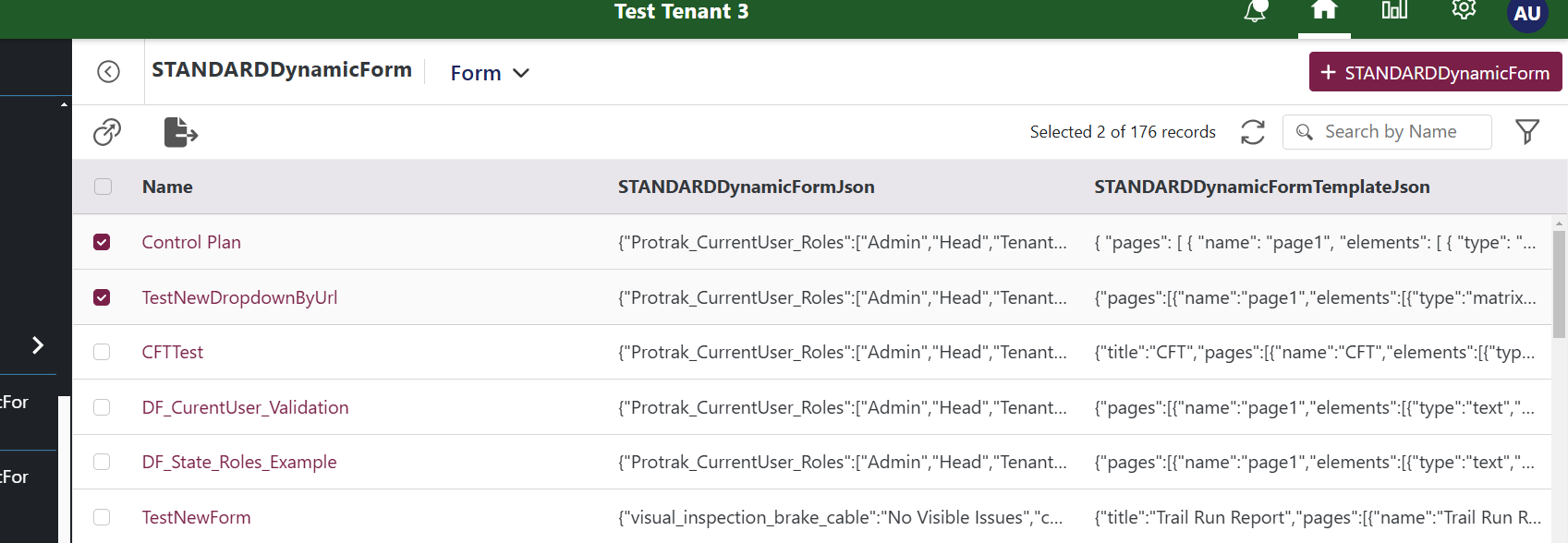
A Custom Action widget appears as a button in the bulk-action toolbar on a dashboard or relation widget. When the user selects one or more records and clicks the button, your widget renders inside a toolbar slot.
Use it when you want a custom bulk operation: export, validate, send a notification, or trigger a workflow across multiple selected records.
pageContext shape
Source: BulkActionButtonRenderer.jsx
{
  displayName,          // The button label configured in Admin
  selectedInstances,    // Array of currently selected record objects
  currentWidgetConfig,  // Widget configuration object from Admin

  // Common (always present)
  settings,
  userData,
}
Each item in selectedInstances includes id, name, instanceTypeName, and optionally attributes (if they were included in the view query).
Example 1 — Download selected records as JSON
Read a JSON attribute from each selected record and bundle them into a downloadable file.
function ExportSelectedAsJson(pageContext) {
  const { protrakComponents } = React.useContext(customWidgetContext);
  const { Button, ButtonEnums, Spinner } = protrakComponents;
  const [loading, setLoading] = React.useState(false);

  const download = async () => {
    setLoading(true);
    const data = pageContext.selectedInstances.map((instance) => ({
      id: instance.id,
      name: instance.name,
    }));
    const blob = new Blob([JSON.stringify(data, null, 2)], {
      type: 'application/json',
    });
    const url = URL.createObjectURL(blob);
    const a = document.createElement('a');
    a.href = url;
    a.download = 'export.json';
    document.body.appendChild(a);
    a.click();
    document.body.removeChild(a);
    setLoading(false);
  };

  return (
    <Button
      onClick={download}
      appearance={ButtonEnums.Appearance.TransparentWithHover}
      size={ButtonEnums.Size.Large}
      title={pageContext.displayName}
    >
      {loading ? <Spinner /> : <i className="fa fa-download" />}
    </Button>
  );
}
Example 2 — Confirm and call an API for each selected record
Show a count of selected items and, on click, call an API to process each one.
function MarkAsReviewedBulkAction(pageContext) {
  const { protrakUtils, protrakComponents } =
    React.useContext(customWidgetContext);
  const { protrakApiClient, useAuthContext } = protrakUtils;
  const { Button, ButtonEnums, Text } = protrakComponents;
  const authContext = useAuthContext();
  const [done, setDone] = React.useState(false);

  const handleClick = async () => {
    const ids = pageContext.selectedInstances.map((i) => i.id);
    await Promise.all(
      ids.map((id) =>
        protrakApiClient(
          `instances/${id}/attributes`,
          {
            method: 'PATCH',
            data: [{ name: 'ReviewStatus', textValue: 'Reviewed' }],
          },
          authContext
        )
      )
    );
    setDone(true);
  };

  if (done)
    return (
      <Text>Marked {pageContext.selectedInstances.length} as Reviewed.</Text>
    );

  return (
    <Button
      onClick={handleClick}
      appearance={ButtonEnums.Appearance.Primary}
      text={`Mark ${pageContext.selectedInstances.length} as Reviewed`}
    />
  );
}
Preview:
Tips
selectedInstancesmay not contain all attribute data. If you need specific attributes, fetch the full instance usingprotrakApiClient.- Always show a loading state while async operations are running.
- Call
pageContext.reload?.()after modifying records to refresh the dashboard. - For deep-dive patterns, see Bulk Action Pattern and Utility Action Pattern.