Custom Attribute Renderer
A CustomAttributeRenderer widget replaces how a single attribute's value is displayed in a list, view, or edit layout. Instead of the default text/number/checkbox that Protrak renders, your widget is called for every row/record that has that attribute.
Use it when you need to:
- Format or decode a value (e.g., show a human-readable label instead of a code)
- Mask sensitive data (show
****instead of a phone number, with a reveal button) - Show a computed value (e.g., divide the raw number by 40 to display square meters)
- Add interactive elements inside a cell (e.g., a badge that opens a dialog)
pageContext shape
Source: Attribute.jsx
{
  attribute: {
    config,              // Full attribute configuration object from Admin
    value,               // Raw stored value (type-specific internal format)
    options,             // Rendering options object (may contain currentInstance etc.)
    getAttributeValue,   // function(value) → decoded/human-readable value (ALWAYS use this)
  },
  currentInstance,             // The full record this attribute cell belongs to
  sourceInstanceAttrValues,    // Attribute values of the parent instance (available in relation contexts)
  reloadSourceInstance,        // function() — trigger reload of the containing record

  // Common (always present)
  settings,
  userData,
}
Always use attribute.getAttributeValue(attribute.value) to get the display-ready value. Do not read attribute.value directly — the internal format is type-specific and encoded.
Example 1 — Display a computed value
Divide a stored numeric value by a constant and display the result.
function AreaRenderer(pageContext) {
  const { attribute } = pageContext;
  const area = attribute.getAttributeValue(attribute.value); // e.g. 960

  if (area === null || area === undefined) return <span>0</span>;
  return <span>{(area / 40).toFixed(2)} m²</span>;
}
Example 2 — Decode a stored code into a label
Show a readable label when the attribute stores a code.
function StatusBadgeRenderer(pageContext) {
  const { attribute } = pageContext;
  const code = attribute.getAttributeValue(attribute.value);

  const labels = {
    OPEN: 'Open',
    IN_PROGRESS: 'In Progress',
    CLOSED: 'Closed',
  };

  const colors = {
    OPEN: '#2383dc',
    IN_PROGRESS: '#f5a623',
    CLOSED: '#27ae60',
  };

  const label = labels[code] ?? code ?? '—';
  const bg = colors[code] ?? '#ccc';

  return (
    <span
      style={{
        background: bg,
        color: 'white',
        padding: '2px 8px',
        borderRadius: '4px',
        fontSize: '0.85em',
      }}
    >
      {label}
    </span>
  );
}
Example 3 — Masked value with reveal toggle
Show **** by default. When the user clicks a toggle, reveal the actual value.
function MaskedPhoneRenderer(pageContext) {
  const { protrakComponents } = React.useContext(customWidgetContext);
  const { Box } = protrakComponents;
  const [revealed, setRevealed] = React.useState(false);

  const phone = pageContext.attribute.getAttributeValue(
    pageContext.attribute.value
  );

  if (!phone) return <span>—</span>;

  return (
    <Box style={{ display: 'flex', alignItems: 'center', gap: '0.5rem' }}>
      <span>{revealed ? phone : '****'}</span>
      <i
        className={`fa ${revealed ? 'fa-eye-slash' : 'fa-eye'}`}
        style={{ cursor: 'pointer', color: '#2383dc' }}
        onClick={() => setRevealed((r) => !r)}
      />
    </Box>
  );
}
Example 4 — Open a dialog on click
Show a summary in the cell; clicking it opens a full dialog with more detail.
function JsonDetailsRenderer(pageContext) {
  const { protrakComponents } = React.useContext(customWidgetContext);
  const { MuiDialog, Button, ButtonEnums, Box, Text } = protrakComponents;
  const [open, setOpen] = React.useState(false);

  const raw = pageContext.attribute.getAttributeValue(
    pageContext.attribute.value
  );
  let parsed = null;
  try {
    parsed = JSON.parse(raw);
  } catch {}

  if (!parsed) return <span>—</span>;

  return (
    <>
      <Button
        appearance={ButtonEnums.Appearance.Link}
        text={`${parsed.length} items`}
        onClick={() => setOpen(true)}
      />
      <MuiDialog
        open={open}
        onClose={() => setOpen(false)}
        title="Details"
        content={
          <Box direction="column">
            {parsed.map((item, i) => (
              <Text key={i}>
                {item.label}: {item.value}
              </Text>
            ))}
          </Box>
        }
      />
    </>
  );
}
Example 5 — Read additional instance attributes from currentInstance
Access other attributes of the same record to compute the displayed value.
function ContractValueRenderer(pageContext) {
  const { attribute, currentInstance } = pageContext;
  const { protrakComponents } = React.useContext(customWidgetContext);
  const { Text } = protrakComponents;

  const contractValue = attribute.getAttributeValue(attribute.value) ?? 0;

  const currency =
    currentInstance?.attributes?.find((a) => a.name === 'Currency')
      ?.textValue ?? 'USD';

  return (
    <Text>
      {currency} {contractValue.toLocaleString()}
    </Text>
  );
}
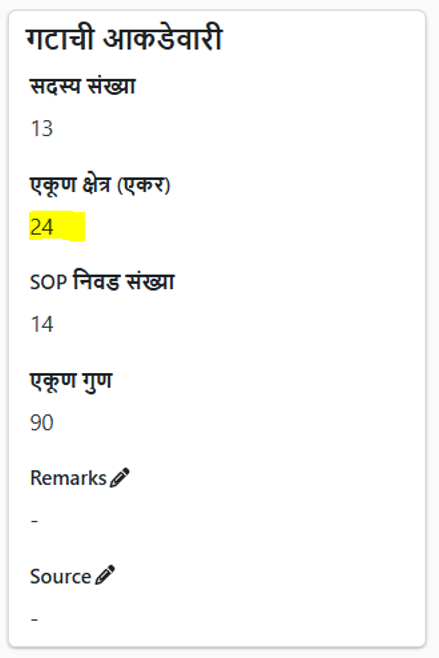
Preview:
Tips
- Always use
getAttributeValue(attribute.value)to get the decoded value — don't readattribute.valuedirectly. - The renderer is called once per row in a list, so keep it fast and avoid API calls inside the renderer.
currentInstancegives you access to the full record. Use it to read sibling attributes for computed displays.- For deep-dive patterns, see Attribute Renderer Pattern.